
From an April Fool's joke to 3 billion users: Google finally grants Gmail users the most in-demand feature


Gmail , one of the world's most popular email services, has come a long way since 2004. But probably, its biggest update in years raises a question nobody expected to be asking. What to do if you want to change your email ID you created years ago? Well, Google has quietly dropped one of the most requested features in Gmail's two-decade history: the ability to change your email address. For the first time, users can swap out a username that has followed them since their teenage years for something a little more dignified. No more mrbrightside416@gmail.com; No more v0t3f0rp3dr02004@gmail.com. Just a clean, sensible address that does not require an explanation at a job interview.

Google CEO Sundar Pichai personally fronted the announcement, writing on social media: “2004 was a good year, but your Gmail address doesn't need to be stuck in it.” Users can now head to their Google Account settings and select any available username, with their old address continuing to work as an alias but in the background. Some say it is a long-overdue update – and for some of us, it is an overdue digital fresh start.
2004 was a good year, but your Gmail address doesn't need to be stuck in it.
To say goodbye to v0t3f0rp3dr02004@gmail.com or mrbrightside416@gmail.com (or whatever you were into at the time), go to your Google Account settings and choose any name available. You'll keep your old username and you can sign in with both.
April 1, 2004: The day nobody believed Google
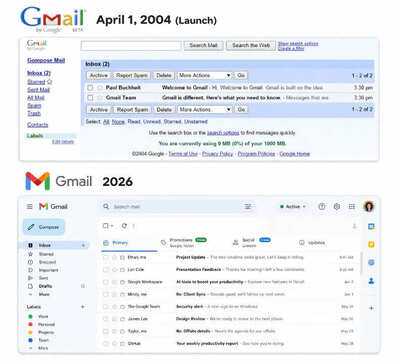
To understand what Gmail has become, you have to go back to where it started, and in the process, appreciate just how unlikely that beginning was. On April 1, 2004, Google announced a free email service offering one gigabyte (1GB) of storage. The date was not a coincidence, and it was not without consequences. Millions of people assumed it was a joke, and even Sundar Pichai, who had joined the company the same year, thought Gmail launch was a prank.
The internet was sceptic: Free webmail services at the time offered a fraction of that storage. For comparison, Microsoft's Hotmail gave users just two megabytes (2MB), and the idea that anyone would hand over a gigabyte for nothing seemed absurd and a positive start for Gmail. Surely Google, the search company, was pulling an elaborate April Fool's prank, everyone thought.

It was not. Gmail was real, and it would go on to become one of the most widely used email service on the planet. The man behind it was Paul Buchheit, the 23rd employee at Google, who had been quietly building the product under a codename, Caribou, that gave nothing away. Buchheit's project was born out of Google’s famous “20 percent time” policy, which encouraged engineers to spend a fifth of their working hours on personal projects outside their core responsibilities,
The idea behind Gmail was to build something better and more human than the cluttered, storage-starved webmail services of the era. Even Pichai said during reported ‘Code Red’ when OpenAI launched ChatGPT – Google was not first but it raced ahead. Reports said he gave the example of Gmail and Google Chrome.
Gmail’s idea was not without criticism. Critics argued that email had nothing to do with search, that Hotmail was already too established to dislodge, and that the project was a distraction. It was only with the backing of Google founders Larry Page and Sergey Brin that Gmail made it to launch day.
How Gmail changed everything
When Gmail arrived, it did not just offer more storage, it offered a fundamentally different way of thinking about email. The most radical idea was simple: stop deleting emails. Every other email service of the era operated on the assumption that inbox space was precious and messages had to be regularly purged but Gmail said: ‘keep everything, search for it later’.
Gmail also introduced conversation threading, grouping replies and responses together into a single chain rather than scattering them across an inbox as individual messages. In 2004, it was a revelation.
Under the hood, Gmail pioneered the use of Ajax — a web development technique that made the interface feel fast and responsive in a way that web applications simply had not before. Clicking through Gmail felt like using a desktop application, not a webpage.
If 1GB of free storage was a weapon, on Gmail's first anniversary in 2005, Google doubled it to two gigabytes (2GB). And by the time rivals began catching up on storage and features, Gmail had already won the loyalty of a generation of users. It became the first mobile app on the Google Play Store to reach one billion installations on Android devices.
A few quirks distinguished Gmail from the start and remain true today. Dots in Gmail addresses started to become meaningless because at that time abc.xyz@gmail.com and abcxyz@gmail.com reach the same inbox. Every Gmail account actually has two addresses: the familiar @gmail.com and its lesser-known twin @googlemail.com, both of which point to the same mailbox.
And Gmail messages can be read, replied to, and searched even without an internet connection, a feature that many long-term users have never discovered.
A new look for a changing world
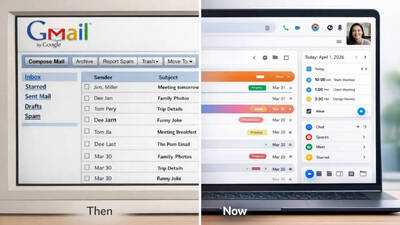
Gmail has also changed a lot visually. Over two decades, it has shed skins several times, moving from the sparse, functional interface of its early years through various redesigns that reflected Google's evolving design philosophy. While there have been tweaks, the most significant visual overhaul came with the introduction of Material Design, Google’s unified visual language that brought cleaner lines, more whitespace, and a more consistent experience across devices.
Later updates added a streamlined sidebar, tighter integration with Google Meet, Chat and other Google Workspace tools and a layout that allowed users to move from their desktop computers to between phones, tablets and laptops throughout the day. While there have been criticisms about each redesign, but the underlying direction has been consistent: simpler, faster and more integrated experience with the broader Google ecosystem.
The AI era: Gmail gets smarter
The most transformative chapter in Gmail’s recent history has nothing to do with storage or design. It is artificial intelligence (AI) and it is reshaping how people interact with their inboxes in ways that would have been unimaginable in 2004.
Smart Reply arrived first, offering short, contextually relevant suggested responses that users could send with a single tap – convenient for quick exchanges.
Smart Compose went further, offering predictive text that anticipates what you are about to write and completes your sentences in real time. The feature learns from your writing patterns over time, becoming gradually more accurate.
Starting today, everyone can use Help Me Write to polish emails or draft them from scratch. There are also new Suggested Replies (an update to Smart Replies) which use the context of your conversation to offer relevant, one-click responses that match how you write.
Say you’re coordinating a family gathering and your aunt replies asking if she should bring cake instead of pie. Suggested Replies can instantly draft an initial response in your tone and style, leaving you free to refine it before giving it your approval. You can also use the new Proofread feature for advanced grammar, tone and style checks so everything is polished before you send.
More recently, Google has integrated its Gemini AI directly into Gmail, offering users the ability to summarise long email threads, draft responses from scratch, and surface information buried in their inboxes. The pitch is efficiency: instead of reading a fifty-message thread, ask Gemini to summarise it. Instead of staring at a blank compose window, ask Gemini to write a first draft.
Your inbox is full of important information, but accessing it has required you to become a power searcher. And even when you find the right emails, you are often left staring at a list of messages, forced to dig through the text to piece together the answer. That’s why we’re introducing AI Overviews.
Just like they do in Google Search, AI Overviews turn information into answers without the digging. When you open an email with dozens of replies, Gmail synthesizes the entire conversation into a concise summary of key points.
And when you ask your inbox a question, we use Gemini to generate a simple AI Overview with the answer. Instead of hunting for keywords or digging through a year of emails, just use natural language, like “Who was the plumber that gave me a quote for the bathroom renovation last year?” Gemini’s advanced reasoning pulls the answer, instantly summarizing the exact details you need.
AI Overview conversation summaries are rolling out today for everyone at no cost.
It is a profound shift in what email is. Gmail began as a place to store and search messages. It is becoming a place where AI reads, summarises and responds to them on your behalf.
So, back to that new email address
Which brings us back to Sundar Pichai's announcement — and the more complicated picture it reveals.
The ability to change your Gmail address is genuinely useful. There are hundreds of millions of people walking around with email addresses they created as children or teenagers, addresses that carry the cultural fingerprints of a different era in their lives.
Being able to update those addresses to something more appropriate is a real quality-of-life improvement, and Google deserves credit for finally delivering it.
Jake Moore, a cybersecurity specialist at ESET (via Forbes), summed up the situation plainly. “An email address used to be permanent but now it's finally editable like a username, which is a huge shift in how identity works online. But until Google creates a 'hide my email' equivalent to what Apple offers, users may be better off creating a separate email address for multiple sign-ins."

How to change your Gmail ID:
Step 1: Check if you can change your Google Account email
Step 2: Review potential issues
There can be some issues with Google services and features if you change your Google Account email that ends in @gmail.com to a new address that ends in @gmail.com. Before you change your Google Account email, check if any of these apply to you:
You connect remotely with Chrome Remote Desktop. Learn how to fix your remote connections. We also recommend that you backup your data as a precaution. Also, some of your app settings may be reset. This is similar to when you sign in on a new device. Learn how to:
Step 3: Change your Google Account email
Gmail launched as a joke that turned out to be serious. It arrived at a moment when email felt like a solved problem and proceeded to solve it differently. It survived the mobile revolution, the social media era and the rise of messaging apps that were supposed to kill it. Now, with 3 billion users and AI woven through its core, it is entering its third decade as the backbone of digital communication for a significant fraction of the human race.
Google CEO Sundar Pichai personally fronted the announcement, writing on social media: “2004 was a good year, but your Gmail address doesn't need to be stuck in it.” Users can now head to their Google Account settings and select any available username, with their old address continuing to work as an alias but in the background. Some say it is a long-overdue update – and for some of us, it is an overdue digital fresh start.
2004 was a good year, but your Gmail address doesn't need to be stuck in it.
To say goodbye to v0t3f0rp3dr02004@gmail.com or mrbrightside416@gmail.com (or whatever you were into at the time), go to your Google Account settings and choose any name available. You'll keep your old username and you can sign in with both.
April 1, 2004: The day nobody believed Google
The internet was sceptic: Free webmail services at the time offered a fraction of that storage. For comparison, Microsoft's Hotmail gave users just two megabytes (2MB), and the idea that anyone would hand over a gigabyte for nothing seemed absurd and a positive start for Gmail. Surely Google, the search company, was pulling an elaborate April Fool's prank, everyone thought.
It was not. Gmail was real, and it would go on to become one of the most widely used email service on the planet. The man behind it was Paul Buchheit, the 23rd employee at Google, who had been quietly building the product under a codename, Caribou, that gave nothing away. Buchheit's project was born out of Google’s famous “20 percent time” policy, which encouraged engineers to spend a fifth of their working hours on personal projects outside their core responsibilities,
The idea behind Gmail was to build something better and more human than the cluttered, storage-starved webmail services of the era. Even Pichai said during reported ‘Code Red’ when OpenAI launched ChatGPT – Google was not first but it raced ahead. Reports said he gave the example of Gmail and Google Chrome.
Gmail’s idea was not without criticism. Critics argued that email had nothing to do with search, that Hotmail was already too established to dislodge, and that the project was a distraction. It was only with the backing of Google founders Larry Page and Sergey Brin that Gmail made it to launch day.
How Gmail changed everything
When Gmail arrived, it did not just offer more storage, it offered a fundamentally different way of thinking about email. The most radical idea was simple: stop deleting emails. Every other email service of the era operated on the assumption that inbox space was precious and messages had to be regularly purged but Gmail said: ‘keep everything, search for it later’.
Gmail also introduced conversation threading, grouping replies and responses together into a single chain rather than scattering them across an inbox as individual messages. In 2004, it was a revelation.
Under the hood, Gmail pioneered the use of Ajax — a web development technique that made the interface feel fast and responsive in a way that web applications simply had not before. Clicking through Gmail felt like using a desktop application, not a webpage.
If 1GB of free storage was a weapon, on Gmail's first anniversary in 2005, Google doubled it to two gigabytes (2GB). And by the time rivals began catching up on storage and features, Gmail had already won the loyalty of a generation of users. It became the first mobile app on the Google Play Store to reach one billion installations on Android devices.
A few quirks distinguished Gmail from the start and remain true today. Dots in Gmail addresses started to become meaningless because at that time abc.xyz@gmail.com and abcxyz@gmail.com reach the same inbox. Every Gmail account actually has two addresses: the familiar @gmail.com and its lesser-known twin @googlemail.com, both of which point to the same mailbox.
And Gmail messages can be read, replied to, and searched even without an internet connection, a feature that many long-term users have never discovered.
A new look for a changing world
Gmail has also changed a lot visually. Over two decades, it has shed skins several times, moving from the sparse, functional interface of its early years through various redesigns that reflected Google's evolving design philosophy. While there have been tweaks, the most significant visual overhaul came with the introduction of Material Design, Google’s unified visual language that brought cleaner lines, more whitespace, and a more consistent experience across devices.
Later updates added a streamlined sidebar, tighter integration with Google Meet, Chat and other Google Workspace tools and a layout that allowed users to move from their desktop computers to between phones, tablets and laptops throughout the day. While there have been criticisms about each redesign, but the underlying direction has been consistent: simpler, faster and more integrated experience with the broader Google ecosystem.
The AI era: Gmail gets smarter
The most transformative chapter in Gmail’s recent history has nothing to do with storage or design. It is artificial intelligence (AI) and it is reshaping how people interact with their inboxes in ways that would have been unimaginable in 2004.
Smart Reply arrived first, offering short, contextually relevant suggested responses that users could send with a single tap – convenient for quick exchanges.
Smart Compose went further, offering predictive text that anticipates what you are about to write and completes your sentences in real time. The feature learns from your writing patterns over time, becoming gradually more accurate.
Starting today, everyone can use Help Me Write to polish emails or draft them from scratch. There are also new Suggested Replies (an update to Smart Replies) which use the context of your conversation to offer relevant, one-click responses that match how you write.
Say you’re coordinating a family gathering and your aunt replies asking if she should bring cake instead of pie. Suggested Replies can instantly draft an initial response in your tone and style, leaving you free to refine it before giving it your approval. You can also use the new Proofread feature for advanced grammar, tone and style checks so everything is polished before you send.
More recently, Google has integrated its Gemini AI directly into Gmail, offering users the ability to summarise long email threads, draft responses from scratch, and surface information buried in their inboxes. The pitch is efficiency: instead of reading a fifty-message thread, ask Gemini to summarise it. Instead of staring at a blank compose window, ask Gemini to write a first draft.
Your inbox is full of important information, but accessing it has required you to become a power searcher. And even when you find the right emails, you are often left staring at a list of messages, forced to dig through the text to piece together the answer. That’s why we’re introducing AI Overviews.
Just like they do in Google Search, AI Overviews turn information into answers without the digging. When you open an email with dozens of replies, Gmail synthesizes the entire conversation into a concise summary of key points.
And when you ask your inbox a question, we use Gemini to generate a simple AI Overview with the answer. Instead of hunting for keywords or digging through a year of emails, just use natural language, like “Who was the plumber that gave me a quote for the bathroom renovation last year?” Gemini’s advanced reasoning pulls the answer, instantly summarizing the exact details you need.
AI Overview conversation summaries are rolling out today for everyone at no cost.
It is a profound shift in what email is. Gmail began as a place to store and search messages. It is becoming a place where AI reads, summarises and responds to them on your behalf.
So, back to that new email address
Which brings us back to Sundar Pichai's announcement — and the more complicated picture it reveals.
The ability to change your Gmail address is genuinely useful. There are hundreds of millions of people walking around with email addresses they created as children or teenagers, addresses that carry the cultural fingerprints of a different era in their lives.
Being able to update those addresses to something more appropriate is a real quality-of-life improvement, and Google deserves credit for finally delivering it.
Jake Moore, a cybersecurity specialist at ESET (via Forbes), summed up the situation plainly. “An email address used to be permanent but now it's finally editable like a username, which is a huge shift in how identity works online. But until Google creates a 'hide my email' equivalent to what Apple offers, users may be better off creating a separate email address for multiple sign-ins."
How to change your Gmail ID:
Step 1: Check if you can change your Google Account email
- On your computer visit myaccount.google.com/google-account-email. You may be asked to sign in.
- At the top left, click "Personal info"
- Click Email and then Google Account email
- Under “Google Account email”, click Change Google Account email. If you don't have this option, it might not be possible to change your Google Account email. If you do have this option, move to step 2.
Step 2: Review potential issues
There can be some issues with Google services and features if you change your Google Account email that ends in @gmail.com to a new address that ends in @gmail.com. Before you change your Google Account email, check if any of these apply to you:
- You use a Chromebook. Learn what you should do first if you use a Chromebook.
- You use Sign in with Google for non-Google sites. Learn how this change may affect Sign in with Google.
- Back up or restore data on your Android device
- Sign in and sync in Chrome
- Export, back up, or restore contacts
- Back up photos & video
- Back up your Timeline data
- Recreate your app settings
Step 3: Change your Google Account email
- Enter the new username that you want to use. You’ll need to choose one that isn’t being used by another Google Account or that was used by someone in the past and then deleted.
- Click Change email and then Yes, change email.
- Follow the steps on the screen.
- When complete, you’ll have a new Google Account email and your old one will show as an alternate email.
Gmail launched as a joke that turned out to be serious. It arrived at a moment when email felt like a solved problem and proceeded to solve it differently. It survived the mobile revolution, the social media era and the rise of messaging apps that were supposed to kill it. Now, with 3 billion users and AI woven through its core, it is entering its third decade as the backbone of digital communication for a significant fraction of the human race.
Next Story