
Google Android Show 2026: All the biggest Android and Gemini announcements


Google hosted its Android Show: I/O Edition 2026 ahead of the company’s annual Google I/O developer conference on May 19, giving users and developers an early look at what is coming to Android. In its official blog post, Google said Android continues to be a platform “where you see the future first,” highlighting its focus on bringing new technologies to billions of users through its open ecosystem and partner network. The company also stressed the growing role of Gemini AI, saying Android is evolving into an “intelligence system” that can better understand user intentions and take actions on their behalf. During the event, Google announced new Gemini-powered features, Android platform upgrades, updates beyond smartphones and several new tools for developers. The company also teased upcoming smart glasses that are expected to launch later this year. Here’s a look at all announcements made by Google at Android Show 2026

A smarter, more proactive Android with Gemini Intelligence
Google has introduced Gemini Intelligence on Android, bringing the best of Gemini to more devices. In its official announcement, Google said that Gemini Intelligence “integrates premium hardware and innovative software to help you stay a step ahead by working proactively to get things done throughout your day — all while keeping your data private, and keeping you in control”.
Gemini Intelligence features will roll out in phases starting with the latest Samsung Galaxy and Google Pixel phones this summer, and will eventually be made available across other Android devices including watch, car, glasses and laptops later this year.
Gemini Intelligence helps you automate tedious tasks so you can focus on what matters. “App automation is even more powerful when you add screen or image context. Instead of manually switching between apps and copying data, Gemini can turn visual context into instant action. Imagine you have a long grocery list on your notes app. Just long press the power button over the list and ask Gemini to build a shopping cart with all of the items for delivery,” Google said.
Or, if you see a travel brochure in a hotel lobby that piques your interest, you can simply snap a photo of it and say: “Find a tour like this on Expedia for a group of six.” You can track the progress live via notifications as Gemini works in the background.
Gemini Intelligence also brings new “Create My Widget” that enables users to “build entirely custom widgets just by describing what you want using natural language. For example, if you're a meal prepper, just ask Create My Widget to "Suggest three high-protein meal prep recipes every week," and watch as it builds a custom dashboard you can add and resize right on your home screen. Or if you’re a cyclist who only cares about wind speed and rain, you can create a weather widget that surfaces those exact stats.”
Gemini Intelligence comes with an updated design language that builds upon Material 3 Expressive. This visual system is functional, animating with purpose to reduce distractions and allow you to focus on the task at hand.
Gemini in Chrome
Google has also announced Gemini in Chrome. “Chrome auto browse can take care of more mundane tasks on your behalf, whether it’s appointment booking or reserving a parking spot,” the announcement reads. Further, by using Gemini’s Personal Intelligence, Android will automatically fill in even more of those tiny text fields across your apps, including Chrome.
“Gemini in Chrome acts as a versatile productivity tool that connects with your favorite Google apps. You can use it to perform various tasks, such as adding events to your calendar, dropping ingredients from a recipe into Keep or finding specific information in Gmail. By offering context-aware assistance, Gemini in Chrome helps you stay organized and efficient, providing a personalized experience that respects your privacy and keeps you in control. For example, if you opt into Personal Intelligence, it can provide responses tailored to your interests, hobbies and even your family and pets,” Google said in its blog.
Gemini in Chrome lets users instantly create highly personalized visuals or customize images they find on the web. For instance, if you are studying for an upcoming exam online but prefer to consume content visually, you might ask “turn this page into an informative infographic.” Or if you are scrolling through apartment listings and want to see how a room may look furnished, just ask your browsing assistant to “alter the image to include modern living room essentials.”
Google says that all these capabilities are built with the same security protections we offer on desktop, defending you against emerging threats like prompt injection so you can maintain peace of mind whether you are on the go or at home. And to provide an added layer of control, auto browse is designed to ask for confirmation before completing sensitive tasks, like making purchases or posting on social media.
Googlebook laptops announced
Google has also Googlebook, a new category of laptops built with Gemini’s helpfulness at its core. A key feature of Googlebook laptops is Magic Pointer that brings Gemini’s helpfulness right to your fingertips. The company is also bringing Create your Widget to Googlebooks, which lets one create custom widgets just by prompting. Gemini can search the internet or connect to your Google apps like Gmail and Calendar to create one personalized dashboard.
Google books are optimized for Android. “Built on part of the Android tech stack allows us to bring new innovations much faster to all our users, including now on laptops. It also lets us provide a much better experience when you have multiple devices, which more and more people have nowadays,” the company said.
Next generation of Android in the car
As announced by Google, Android Auto is getting a full refresh this year that brings personal design touches, widgets one can see at a glance and edge-to-edge Google Maps to your dash. Android Auto brings the Material 3 Expressive design from Android smartphones to cars with expressive fonts, smooth animations and wallpapers. “You can customize even further with widgets, which let you see the things that matter to you at a glance, even while actively navigating. Add a shortcut to your favorite contacts, a one-tap garage door opener, a weather overview and more”.
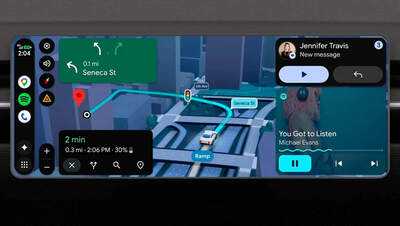
At the core of experience is Immersive Navigation — the company’s biggest update to Google Maps in over a decade. “Your map will come to life with a vivid 3D view that shows buildings, overpasses and terrain. It will highlight critical details — including lanes, traffic lights and stop signs — to help you make tricky turns and merge confidently”.
For the first time in Android Auto, Google has introduced support for 60fps full HD in supported cars later this year, starting with BMW, Ford, Genesis, Hyundai, Kia, Mahindra, Mercedes-Benz, Renault, Škoda, Tata and Volvo.
Gemini is now widely available in Android Auto to help you get more done, brainstorm ideas or learn something new while driving. And if your phone has Gemini Intelligence, you’ll be able to access it in Android Auto later this year. With Gemini Intelligence, your device understands your context, anticipates your needs and gets things done on your behalf.
Android makes it easier to share, switch and connect securely
Google has overhauled the iOS-to-Android transfer process to ensure data moves swiftly. “Your passwords, photos, messages, favorite apps, contacts and even your homescreen layout can migrate wirelessly from your iPhone to your new Android device. This upgraded process, which also supports eSIM transfer, will launch first on Samsung Galaxy and Google Pixel devices this year”.
Reclaim your time with Pause Point
Another major feature announced by Google at its Android Show 2026 is Pause Point that gives you a 10-second breather to ask, “Why am I here?” During that pause, you can do a short breathing exercise or set a timer so you don’t spend too much time scrolling. You can also look at some favorite photos or jump to alternative app suggestions, like an audiobook.
“Reclaim time for the things you actually love and quit autopilot app use with Pause Point,” the official announcement reads.
Express yourself with new 3D emoji
Google has moved from beloved innocent blob emoji of the 2010s to Noto 3D. Announcing the new emoji collection, Google said that “emoji are the universal language of our digital lives and they’ve never felt more alive. Our feelings have weight, but they often fall flat when expressed online”.
These 3D emoji bring a touch of physicality to these moments and help you overcome this digital divide. It’s the difference between a message received and a presence felt. Noto 3D will be available across Google, starting with Pixel phones, later this year.

Security & Privacy feature on Gemini Intelligence
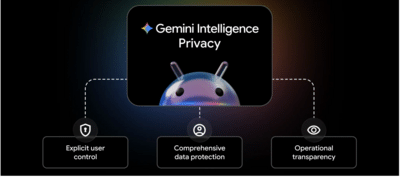
Gemini Intelligence on Android comes with three core principles:
1. Explicit user control
Granular controls: You have the choice to explicitly enable or disable entire AI features, and you also have granular control over specific parts. For example, connecting Gemini to Autofill with Google is strictly opt-in, meaning you choose if and when you want to connect to Gemini - and you can always turn this connection on or off in your settings. And you will be able to turn on Gemini app automation for specific apps in your settings later this year.
Security guardrails: Your Gemini assistant starts to automate a task only when you tell it to. Gemini can only access the apps you allow it to work in, and not the rest of your device. Gemini is designed to require user confirmation before making purchases on your behalf.
Explicit intent: For any feature, whether user-initiated (e.g., asking Gemini to automate an app on your behalf) or proactive (e.g., Magic Cue), you decide whether your data is shared with applications or Gemini in settings, permission screens, or by action, like when you tap a suggestion from Magic Cue.
2. Comprehensive data protection
Cutting-edge technologies: We use technologies like Private Compute Core, Private AI Compute, or protected KVM to safeguard ambient data processed by proactive assistance features, like Magic Cue.
Proven architecture: Many Gemini Intelligence features leverage the same infrastructure that already protects Google products used by billions of people everyday. Your data stays protected within Google’s secure ecosystem, ensuring it is handled with the same trusted safeguards.
Advanced defenses: To counter emerging threats like prompt injection, we’re building new safeguards into Android for when Gemini takes action on your behalf. This adds another layer of security to your device, similar to the protections already found in Chrome’s auto browse feature.
2. Operational transparency
Visibility when working: When Gemini is automating an app’s interface, you can select “View progress” to watch its actions in real-time. If you navigate away, you'll still see a notification chip at the top of your screen that you can't dismiss — so it's always clear when it's running. And if you’re using Rambler, a Gemini-powered voice feature, it will clearly show you when you’ve enabled it to help convert your voice to text.
AI assistant activity history: We’ll soon be enhancing Android Privacy Dashboard to show which AI assistants were active and which apps they used in the last 24 hours.
Auditable code: For added transparency, key parts of our AI security architecture are open-source, binary transparent, and audited by third-party experts so you can be confident that your data is handled exactly as we say.
Creative updates coming to Android
Google has partnered with Meta to bring the best of Instagram to most advanced Android devices. This includes:
Ultra HDR capture and playback: Lifelike vibrancy with colors that truly pop.
Built-in video stabilization: Smooth video for when you’re walking, dancing or just highly caffeinated.
Night sight integrations: The perfect shot even in the dimmest settings.
The company is also bringing Screen Reactions enabling users to record themselves and their screens at the same time with a few taps, “letting you overlay your authentic response directly onto trending clips, wild comment sections or your latest gift guide”.
Google has also introduced new tools to Instagram’s Edits app, exclusively on Android. These features turn raw footage into polished content in seconds using on-device AI. Key upgrades include:
Smart enhance: With a single tap, you can instantly upscale your photos and videos with advanced on-device AI.
Sound separation: If you’ve ever struggled through multiple retakes because something or someone interrupted your video, the Edits app will now identify and separate out audio tracks — wind, noise, and music — to boost the sounds that you want and remove what you don’t.
A smarter, more proactive Android with Gemini Intelligence
Google has introduced Gemini Intelligence on Android, bringing the best of Gemini to more devices. In its official announcement, Google said that Gemini Intelligence “integrates premium hardware and innovative software to help you stay a step ahead by working proactively to get things done throughout your day — all while keeping your data private, and keeping you in control”.
Gemini Intelligence features will roll out in phases starting with the latest Samsung Galaxy and Google Pixel phones this summer, and will eventually be made available across other Android devices including watch, car, glasses and laptops later this year.
Gemini Intelligence helps you automate tedious tasks so you can focus on what matters. “App automation is even more powerful when you add screen or image context. Instead of manually switching between apps and copying data, Gemini can turn visual context into instant action. Imagine you have a long grocery list on your notes app. Just long press the power button over the list and ask Gemini to build a shopping cart with all of the items for delivery,” Google said.
Or, if you see a travel brochure in a hotel lobby that piques your interest, you can simply snap a photo of it and say: “Find a tour like this on Expedia for a group of six.” You can track the progress live via notifications as Gemini works in the background.
Gemini Intelligence also brings new “Create My Widget” that enables users to “build entirely custom widgets just by describing what you want using natural language. For example, if you're a meal prepper, just ask Create My Widget to "Suggest three high-protein meal prep recipes every week," and watch as it builds a custom dashboard you can add and resize right on your home screen. Or if you’re a cyclist who only cares about wind speed and rain, you can create a weather widget that surfaces those exact stats.”
Gemini Intelligence comes with an updated design language that builds upon Material 3 Expressive. This visual system is functional, animating with purpose to reduce distractions and allow you to focus on the task at hand.
Gemini in Chrome
Google has also announced Gemini in Chrome. “Chrome auto browse can take care of more mundane tasks on your behalf, whether it’s appointment booking or reserving a parking spot,” the announcement reads. Further, by using Gemini’s Personal Intelligence, Android will automatically fill in even more of those tiny text fields across your apps, including Chrome.
“Gemini in Chrome acts as a versatile productivity tool that connects with your favorite Google apps. You can use it to perform various tasks, such as adding events to your calendar, dropping ingredients from a recipe into Keep or finding specific information in Gmail. By offering context-aware assistance, Gemini in Chrome helps you stay organized and efficient, providing a personalized experience that respects your privacy and keeps you in control. For example, if you opt into Personal Intelligence, it can provide responses tailored to your interests, hobbies and even your family and pets,” Google said in its blog.
Gemini in Chrome lets users instantly create highly personalized visuals or customize images they find on the web. For instance, if you are studying for an upcoming exam online but prefer to consume content visually, you might ask “turn this page into an informative infographic.” Or if you are scrolling through apartment listings and want to see how a room may look furnished, just ask your browsing assistant to “alter the image to include modern living room essentials.”
Google says that all these capabilities are built with the same security protections we offer on desktop, defending you against emerging threats like prompt injection so you can maintain peace of mind whether you are on the go or at home. And to provide an added layer of control, auto browse is designed to ask for confirmation before completing sensitive tasks, like making purchases or posting on social media.
Googlebook laptops announced
Google has also Googlebook, a new category of laptops built with Gemini’s helpfulness at its core. A key feature of Googlebook laptops is Magic Pointer that brings Gemini’s helpfulness right to your fingertips. The company is also bringing Create your Widget to Googlebooks, which lets one create custom widgets just by prompting. Gemini can search the internet or connect to your Google apps like Gmail and Calendar to create one personalized dashboard.
Google books are optimized for Android. “Built on part of the Android tech stack allows us to bring new innovations much faster to all our users, including now on laptops. It also lets us provide a much better experience when you have multiple devices, which more and more people have nowadays,” the company said.
Next generation of Android in the car
As announced by Google, Android Auto is getting a full refresh this year that brings personal design touches, widgets one can see at a glance and edge-to-edge Google Maps to your dash. Android Auto brings the Material 3 Expressive design from Android smartphones to cars with expressive fonts, smooth animations and wallpapers. “You can customize even further with widgets, which let you see the things that matter to you at a glance, even while actively navigating. Add a shortcut to your favorite contacts, a one-tap garage door opener, a weather overview and more”.
At the core of experience is Immersive Navigation — the company’s biggest update to Google Maps in over a decade. “Your map will come to life with a vivid 3D view that shows buildings, overpasses and terrain. It will highlight critical details — including lanes, traffic lights and stop signs — to help you make tricky turns and merge confidently”.
For the first time in Android Auto, Google has introduced support for 60fps full HD in supported cars later this year, starting with BMW, Ford, Genesis, Hyundai, Kia, Mahindra, Mercedes-Benz, Renault, Škoda, Tata and Volvo.
Gemini is now widely available in Android Auto to help you get more done, brainstorm ideas or learn something new while driving. And if your phone has Gemini Intelligence, you’ll be able to access it in Android Auto later this year. With Gemini Intelligence, your device understands your context, anticipates your needs and gets things done on your behalf.
Android makes it easier to share, switch and connect securely
Google has overhauled the iOS-to-Android transfer process to ensure data moves swiftly. “Your passwords, photos, messages, favorite apps, contacts and even your homescreen layout can migrate wirelessly from your iPhone to your new Android device. This upgraded process, which also supports eSIM transfer, will launch first on Samsung Galaxy and Google Pixel devices this year”.
Reclaim your time with Pause Point
Another major feature announced by Google at its Android Show 2026 is Pause Point that gives you a 10-second breather to ask, “Why am I here?” During that pause, you can do a short breathing exercise or set a timer so you don’t spend too much time scrolling. You can also look at some favorite photos or jump to alternative app suggestions, like an audiobook.
“Reclaim time for the things you actually love and quit autopilot app use with Pause Point,” the official announcement reads.
Express yourself with new 3D emoji
Google has moved from beloved innocent blob emoji of the 2010s to Noto 3D. Announcing the new emoji collection, Google said that “emoji are the universal language of our digital lives and they’ve never felt more alive. Our feelings have weight, but they often fall flat when expressed online”.
These 3D emoji bring a touch of physicality to these moments and help you overcome this digital divide. It’s the difference between a message received and a presence felt. Noto 3D will be available across Google, starting with Pixel phones, later this year.
Security & Privacy feature on Gemini Intelligence
Gemini Intelligence on Android comes with three core principles:
1. Explicit user control
Granular controls: You have the choice to explicitly enable or disable entire AI features, and you also have granular control over specific parts. For example, connecting Gemini to Autofill with Google is strictly opt-in, meaning you choose if and when you want to connect to Gemini - and you can always turn this connection on or off in your settings. And you will be able to turn on Gemini app automation for specific apps in your settings later this year.
Security guardrails: Your Gemini assistant starts to automate a task only when you tell it to. Gemini can only access the apps you allow it to work in, and not the rest of your device. Gemini is designed to require user confirmation before making purchases on your behalf.
Explicit intent: For any feature, whether user-initiated (e.g., asking Gemini to automate an app on your behalf) or proactive (e.g., Magic Cue), you decide whether your data is shared with applications or Gemini in settings, permission screens, or by action, like when you tap a suggestion from Magic Cue.
2. Comprehensive data protection
Cutting-edge technologies: We use technologies like Private Compute Core, Private AI Compute, or protected KVM to safeguard ambient data processed by proactive assistance features, like Magic Cue.
Proven architecture: Many Gemini Intelligence features leverage the same infrastructure that already protects Google products used by billions of people everyday. Your data stays protected within Google’s secure ecosystem, ensuring it is handled with the same trusted safeguards.
Advanced defenses: To counter emerging threats like prompt injection, we’re building new safeguards into Android for when Gemini takes action on your behalf. This adds another layer of security to your device, similar to the protections already found in Chrome’s auto browse feature.
2. Operational transparency
Visibility when working: When Gemini is automating an app’s interface, you can select “View progress” to watch its actions in real-time. If you navigate away, you'll still see a notification chip at the top of your screen that you can't dismiss — so it's always clear when it's running. And if you’re using Rambler, a Gemini-powered voice feature, it will clearly show you when you’ve enabled it to help convert your voice to text.
AI assistant activity history: We’ll soon be enhancing Android Privacy Dashboard to show which AI assistants were active and which apps they used in the last 24 hours.
Auditable code: For added transparency, key parts of our AI security architecture are open-source, binary transparent, and audited by third-party experts so you can be confident that your data is handled exactly as we say.
Creative updates coming to Android
Google has partnered with Meta to bring the best of Instagram to most advanced Android devices. This includes:
Ultra HDR capture and playback: Lifelike vibrancy with colors that truly pop.
Built-in video stabilization: Smooth video for when you’re walking, dancing or just highly caffeinated.
Night sight integrations: The perfect shot even in the dimmest settings.
The company is also bringing Screen Reactions enabling users to record themselves and their screens at the same time with a few taps, “letting you overlay your authentic response directly onto trending clips, wild comment sections or your latest gift guide”.
Google has also introduced new tools to Instagram’s Edits app, exclusively on Android. These features turn raw footage into polished content in seconds using on-device AI. Key upgrades include:
Smart enhance: With a single tap, you can instantly upscale your photos and videos with advanced on-device AI.
Sound separation: If you’ve ever struggled through multiple retakes because something or someone interrupted your video, the Edits app will now identify and separate out audio tracks — wind, noise, and music — to boost the sounds that you want and remove what you don’t.
Next Story