
Apple Pay: How iPhone users can make payments


Apple Pay is now available in India for users of iPhone, iPad and Apple Watch. Mac support will be added soon, Apple India said in an update on its official website The service allows customers to make contactless payments at stores, in apps and on websites without entering a Personal Identification Number (PIN) or One-time Password (OTP) at the time of payment, as per the Apple Pay statement.
Jennifer Bailey, Apple’s vice president of Apple Pay and Apple Wallet, said, “Apple Pay makes everyday payments with a card easy, secure, and private — from simply tapping to pay in stores without an extra app, PIN, or OTP to checking out online without repeatedly entering payment information.”
Customers with Axis Bank-issued Visa and Mastercard credit cards can add their cards to Apple Pay and use them at its in-store and online merchants across India, as well as anywhere that accepts Near Field Communication (NFC) transactions, or in simple terms tap-to-pay transactions.
Can you use Apple Pay for online payments?
Yes. Apple Pay can also be used to make purchases on an iPhone and iPad in apps and on the web.
Which merchants will accept Apple Pay in India?
Apple Pay will be accepted by Apple Store, Blinkit, Chaayos, Comet, Croma, Interflora, Ixigo, Le15 Patisserie, Reliance brands, Tata 1mg, Zomato, and more.
“Apple has worked closely with payment service providers (PSPs) like Cashfree, JusPay, Mswipe, Paytm, PayU, Pine Labs, Razorpay, Worldline, and more to bring Apple Pay to their merchant networks in India,” says Apple Pay.
Will you get credit card rewards?
Yes. Customers will continue receiving rewards and benefits offered by their cards when they use Apple Pay.
How to make payments using Apple Pay in stores
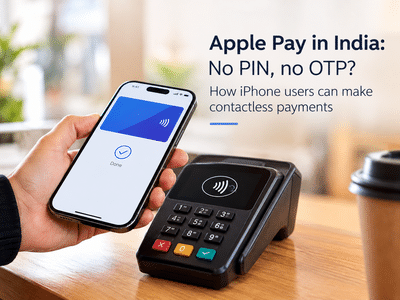
On an iPhone, users can double-click the side button or the Home button. They can then authenticate the payment using Face ID, Touch ID or the device passcode, if prompted and hold the top of the iPhone or display of Apple Watch near the contactless reader to pay.
The payment can then be completed through the contactless terminal.
How to add an Axis Bank credit card to Apple Pay
Axis Bank customers can add an eligible credit card to Apple Pay directly through the latest version of the Axis Bank app.
Another option is to use the Apple Wallet app on the iPhone.
To add the card:
Open the Wallet app on your iPhone.
Tap the plus (+) sign.
Follow the instructions displayed on the screen.
Add the eligible Axis Bank credit card.
Once the card has been added to the Apple device, it can be used for Apple Pay transactions.
Which Axis credit cards are eligible?
Customers with Axis Bank-issued Visa and Mastercard credit cards can add their cards to Apple Pay and use them at thousands of in-store and online merchants across India, as well as anywhere that accepts NFC (Near Field Communication)transactions.
Jennifer Bailey, Apple’s vice president of Apple Pay and Apple Wallet, said, “Apple Pay makes everyday payments with a card easy, secure, and private — from simply tapping to pay in stores without an extra app, PIN, or OTP to checking out online without repeatedly entering payment information.”
Customers with Axis Bank-issued Visa and Mastercard credit cards can add their cards to Apple Pay and use them at its in-store and online merchants across India, as well as anywhere that accepts Near Field Communication (NFC) transactions, or in simple terms tap-to-pay transactions.
Can you use Apple Pay for online payments?
Yes. Apple Pay can also be used to make purchases on an iPhone and iPad in apps and on the web.
Which merchants will accept Apple Pay in India?
Apple Pay will be accepted by Apple Store, Blinkit, Chaayos, Comet, Croma, Interflora, Ixigo, Le15 Patisserie, Reliance brands, Tata 1mg, Zomato, and more.
“Apple has worked closely with payment service providers (PSPs) like Cashfree, JusPay, Mswipe, Paytm, PayU, Pine Labs, Razorpay, Worldline, and more to bring Apple Pay to their merchant networks in India,” says Apple Pay.
Will you get credit card rewards?
Yes. Customers will continue receiving rewards and benefits offered by their cards when they use Apple Pay.
How to make payments using Apple Pay in stores
On an iPhone, users can double-click the side button or the Home button. They can then authenticate the payment using Face ID, Touch ID or the device passcode, if prompted and hold the top of the iPhone or display of Apple Watch near the contactless reader to pay.
The payment can then be completed through the contactless terminal.
How to add an Axis Bank credit card to Apple Pay
Axis Bank customers can add an eligible credit card to Apple Pay directly through the latest version of the Axis Bank app.
Another option is to use the Apple Wallet app on the iPhone.
To add the card:
Open the Wallet app on your iPhone.
Tap the plus (+) sign.
Follow the instructions displayed on the screen.
Add the eligible Axis Bank credit card.
Once the card has been added to the Apple device, it can be used for Apple Pay transactions.
Which Axis credit cards are eligible?
Customers with Axis Bank-issued Visa and Mastercard credit cards can add their cards to Apple Pay and use them at thousands of in-store and online merchants across India, as well as anywhere that accepts NFC (Near Field Communication)transactions.
Next Story