
1980s AI photo trend: 7 ChatGPT prompts to turn your photos retro


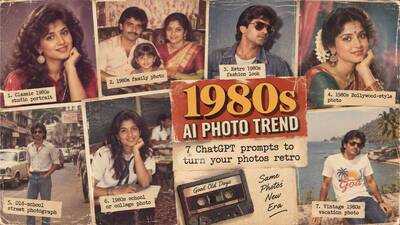
The 1980s AI photo trend can help give ordinary pictures a retro makeover, with people using AI tools to recreate the look of old photographs. A modern portrait can be turned into a vintage studio picture, an old-school family photo or a colourful 1980s-style fashion shot with a simple text prompt. ChatGPT can also change the clothes, background, lighting and camera style while keeping the person recognisable. For people looking to try the trend, here are seven simple ChatGPT prompts for 1980s photos that can transform a regular picture into a retro image.
How to create a 1980s AI photo with ChatGPT
To try the trend, upload a clear photo to ChatGPT and describe the 1980s look you want. The more details you provide about the clothes, setting, lighting and photography style, the more control you have over the result.
Users can also ask ChatGPT to keep their facial features, hairstyle and identity unchanged while modifying the rest of the image.
Here are seven prompts to try.
1. Classic 1980s studio portrait
For a simple vintage portrait, use this prompt:
“Transform my photo into a realistic 1980s studio portrait. Keep my face, facial features and identity unchanged. Give me an authentic 1980s hairstyle and outfit, with soft studio lighting, a simple coloured backdrop and the look of a vintage film camera. Add subtle film grain, natural skin texture and slightly faded colours. Make it look like a real photograph taken in the 1980s, not a modern digital image.”
2. 1980s family photo
This prompt can give a modern picture the feel of an old family album:
“Turn my photo into an authentic 1980s family album photograph. Keep everyone’s faces and identities unchanged. Add simple 1980s clothing, a warm indoor living-room setting, vintage furniture and soft flash photography. Use slightly faded colours, natural film grain and the imperfections of an old printed photograph. Make the image look realistic and nostalgic.”
3. Retro 1980s fashion look
For a more stylish version of the trend, try:
“Transform my photo into a glamorous 1980s fashion portrait . Keep my face and identity exactly the same. Give me authentic 1980s fashion, big hair, bold accessories and a stylish studio background. Use dramatic flash photography, strong highlights, subtle film grain and rich vintage colours. Make it look like a real fashion photograph from the 1980s.”
4. 1980s Bollywood-style photo
Those looking for an Indian retro look can use:
“Transform my photo into an authentic 1980s Indian film-style portrait. Keep my facial features and identity unchanged. Dress me in classic 1980s Indian fashion with period-appropriate hair and jewellery. Add a colourful studio backdrop, warm lighting and vintage film photography. Use realistic skin texture, soft film grain and slightly faded colours. Make it look like a genuine photograph from the 1980s.”
5. Old-school street photograph
For a more natural picture rather than a studio portrait:
“Turn my photo into a realistic 1980s street photograph. Keep my face and identity unchanged. Place me on a busy city street with period-correct cars, shops, signs and clothing. Use an authentic vintage film-camera look, natural daylight, slight motion blur, film grain and faded colours. Make the scene look like it was photographed in the 1980s.”
6. 1980s school or college photo
This prompt can recreate the look of an old school or college album:
“Transform my photo into a realistic 1980s school or college photograph. Keep my face, facial features and identity unchanged. Give me authentic 1980s clothing and hairstyle and place me in a period-correct classroom or college setting. Use simple flash photography, slightly faded colours, natural film grain and the texture of an old printed photograph.”
7. Vintage 1980s vacation photo
For a nostalgic holiday picture, try:
“Turn my photo into an authentic 1980s vacation photograph. Keep my face and identity unchanged. Place me at a classic holiday destination with period-correct clothes, cars and surroundings. Use a vintage film-camera look, direct flash, warm sunlight, slight grain, faded colours and realistic imperfections. Make it look like a real holiday photograph taken and printed in the 1980s.”
How to make the 1980s AI photo look more realisticA good prompt does not need to be extremely long. However, adding a few specific details can make the result more convincing.
Users can include phrases such as:
How to create a 1980s AI photo with ChatGPT
To try the trend, upload a clear photo to ChatGPT and describe the 1980s look you want. The more details you provide about the clothes, setting, lighting and photography style, the more control you have over the result.
Users can also ask ChatGPT to keep their facial features, hairstyle and identity unchanged while modifying the rest of the image.
Here are seven prompts to try.
1. Classic 1980s studio portrait
For a simple vintage portrait, use this prompt:
“Transform my photo into a realistic 1980s studio portrait. Keep my face, facial features and identity unchanged. Give me an authentic 1980s hairstyle and outfit, with soft studio lighting, a simple coloured backdrop and the look of a vintage film camera. Add subtle film grain, natural skin texture and slightly faded colours. Make it look like a real photograph taken in the 1980s, not a modern digital image.”
2. 1980s family photo
This prompt can give a modern picture the feel of an old family album:
“Turn my photo into an authentic 1980s family album photograph. Keep everyone’s faces and identities unchanged. Add simple 1980s clothing, a warm indoor living-room setting, vintage furniture and soft flash photography. Use slightly faded colours, natural film grain and the imperfections of an old printed photograph. Make the image look realistic and nostalgic.”
3. Retro 1980s fashion look
For a more stylish version of the trend, try:
“Transform my photo into a glamorous 1980s fashion portrait . Keep my face and identity exactly the same. Give me authentic 1980s fashion, big hair, bold accessories and a stylish studio background. Use dramatic flash photography, strong highlights, subtle film grain and rich vintage colours. Make it look like a real fashion photograph from the 1980s.”
4. 1980s Bollywood-style photo
Those looking for an Indian retro look can use:
“Transform my photo into an authentic 1980s Indian film-style portrait. Keep my facial features and identity unchanged. Dress me in classic 1980s Indian fashion with period-appropriate hair and jewellery. Add a colourful studio backdrop, warm lighting and vintage film photography. Use realistic skin texture, soft film grain and slightly faded colours. Make it look like a genuine photograph from the 1980s.”
5. Old-school street photograph
For a more natural picture rather than a studio portrait:
“Turn my photo into a realistic 1980s street photograph. Keep my face and identity unchanged. Place me on a busy city street with period-correct cars, shops, signs and clothing. Use an authentic vintage film-camera look, natural daylight, slight motion blur, film grain and faded colours. Make the scene look like it was photographed in the 1980s.”
6. 1980s school or college photo
This prompt can recreate the look of an old school or college album:
“Transform my photo into a realistic 1980s school or college photograph. Keep my face, facial features and identity unchanged. Give me authentic 1980s clothing and hairstyle and place me in a period-correct classroom or college setting. Use simple flash photography, slightly faded colours, natural film grain and the texture of an old printed photograph.”
7. Vintage 1980s vacation photo
For a nostalgic holiday picture, try:
“Turn my photo into an authentic 1980s vacation photograph. Keep my face and identity unchanged. Place me at a classic holiday destination with period-correct clothes, cars and surroundings. Use a vintage film-camera look, direct flash, warm sunlight, slight grain, faded colours and realistic imperfections. Make it look like a real holiday photograph taken and printed in the 1980s.”
How to make the 1980s AI photo look more realisticA good prompt does not need to be extremely long. However, adding a few specific details can make the result more convincing.
Users can include phrases such as:
- “authentic 1980s film photography”
- “subtle film grain”
- “slightly faded colours”
- “direct camera flash”
- “old printed photograph”
- “period-correct clothing and objects”
- “keep my facial features unchanged”
- “avoid a modern digital photography look”
Next Story