
Apple's latest beta puts AI to work in conversations, at the gym and in the Health app


Someone gives you an address. You catch the street name but miss the building number, and the conversation has already moved on. On the Apple Watch Series 12 , a double press of the Digital Crown brings up the last 15 seconds as text. Apple calls it Live Rewind. Fifteen seconds sounds stingy until you think about how little of a conversation you usually need back.
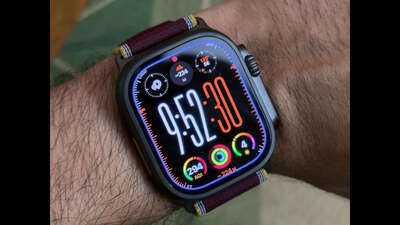
Live Rewind and Siri Recap have begun developer beta testing with iOS 27.3, with a public beta to follow. Both are opt-in features for the Series 12 and Ultra 4. Live Rewind has the clearer pitch. A glance at the wrist might be enough to recover a name or a number. The snippet disappears automatically unless it’s saved to the Siri app, and there’s an option to ask Siri about something in it.
The double press also triggers a chime, even in silent mode, and an animation on the Watch. That makes an otherwise subtle gesture visible to the people around the wearer. It also gives the feature an interesting social wrinkle. In some conversations, it may still feel more natural to ask someone to repeat themselves.
How much of a conversation is worth keeping?
Siri Recap turns a conversation into a title and a short list of key points. Users can choose when and where it runs, and unsaved recaps are deleted within seven days. Apple says the feature does not identify speakers or retain raw audio. That makes it easier to see the appeal as a memory aid, though the lack of speaker attribution matters when the most important detail in a meeting is who agreed to do what.
The real test for both features in India will be what happens when a conversation slips from English into Hindi, two people speak at once and a name or deadline gets buried in the middle. Live Rewind only has to recover a few words to be useful. Siri Recap has a harder job. It has to know which few words mattered.
A better reason to glance at the Watch between sets
Fitness+ Gym Strength addresses a familiar gym problem. It’s easy to track how long a workout took. Figuring out what to lift today, and whether to go heavier than last week, takes more thought. Apple builds a four-week programme around the user’s goals, experience, schedule and available equipment, then adjusts it based on how training goes.
The iPhone or iPad holds the plan and the exercise videos. On the Watch, users can check the next exercise, see the suggested reps and weight, and log what they actually managed. That division suits the gym. A video is worth pulling out the phone for when an exercise is unfamiliar. Checking whether the next set calls for eight reps or 12 should take a glance. The more revealing test will come when a three-session week turns into a one-session week and the plan has to adapt.
The redesigned Health app , back in beta, offers a different sort of first impression. Health Age will probably get the first tap. It’s hard to resist finding out how old your phone thinks you are. The movement assessments have more potential to bring people back, especially if they can explain what’s changed over time in terms that help people decide how much to move or train.
Gym Strength makes the strongest case for keeping the phone in the bag. Live Rewind is the more distinctive addition. After years of the Apple Watch tapping its wearer to deliver a notification, there’s finally an interesting reason to tap it back.
Live Rewind and Siri Recap have begun developer beta testing with iOS 27.3, with a public beta to follow. Both are opt-in features for the Series 12 and Ultra 4. Live Rewind has the clearer pitch. A glance at the wrist might be enough to recover a name or a number. The snippet disappears automatically unless it’s saved to the Siri app, and there’s an option to ask Siri about something in it.
The double press also triggers a chime, even in silent mode, and an animation on the Watch. That makes an otherwise subtle gesture visible to the people around the wearer. It also gives the feature an interesting social wrinkle. In some conversations, it may still feel more natural to ask someone to repeat themselves.
How much of a conversation is worth keeping?
Siri Recap turns a conversation into a title and a short list of key points. Users can choose when and where it runs, and unsaved recaps are deleted within seven days. Apple says the feature does not identify speakers or retain raw audio. That makes it easier to see the appeal as a memory aid, though the lack of speaker attribution matters when the most important detail in a meeting is who agreed to do what.
The real test for both features in India will be what happens when a conversation slips from English into Hindi, two people speak at once and a name or deadline gets buried in the middle. Live Rewind only has to recover a few words to be useful. Siri Recap has a harder job. It has to know which few words mattered.
A better reason to glance at the Watch between sets
Fitness+ Gym Strength addresses a familiar gym problem. It’s easy to track how long a workout took. Figuring out what to lift today, and whether to go heavier than last week, takes more thought. Apple builds a four-week programme around the user’s goals, experience, schedule and available equipment, then adjusts it based on how training goes.
The iPhone or iPad holds the plan and the exercise videos. On the Watch, users can check the next exercise, see the suggested reps and weight, and log what they actually managed. That division suits the gym. A video is worth pulling out the phone for when an exercise is unfamiliar. Checking whether the next set calls for eight reps or 12 should take a glance. The more revealing test will come when a three-session week turns into a one-session week and the plan has to adapt.
The redesigned Health app , back in beta, offers a different sort of first impression. Health Age will probably get the first tap. It’s hard to resist finding out how old your phone thinks you are. The movement assessments have more potential to bring people back, especially if they can explain what’s changed over time in terms that help people decide how much to move or train.
Gym Strength makes the strongest case for keeping the phone in the bag. Live Rewind is the more distinctive addition. After years of the Apple Watch tapping its wearer to deliver a notification, there’s finally an interesting reason to tap it back.
Next Story