
ChatGPT ’80s Photo Trend: How To Turn Your Picture Into A Retro Portrait

Instagram is getting a nostalgic makeover, with users sharing portraits that look like they were taken decades ago. The catch? Many of these pictures are not old photographs at all. They are AI-generated images created with ChatGPT and other image-generation tools.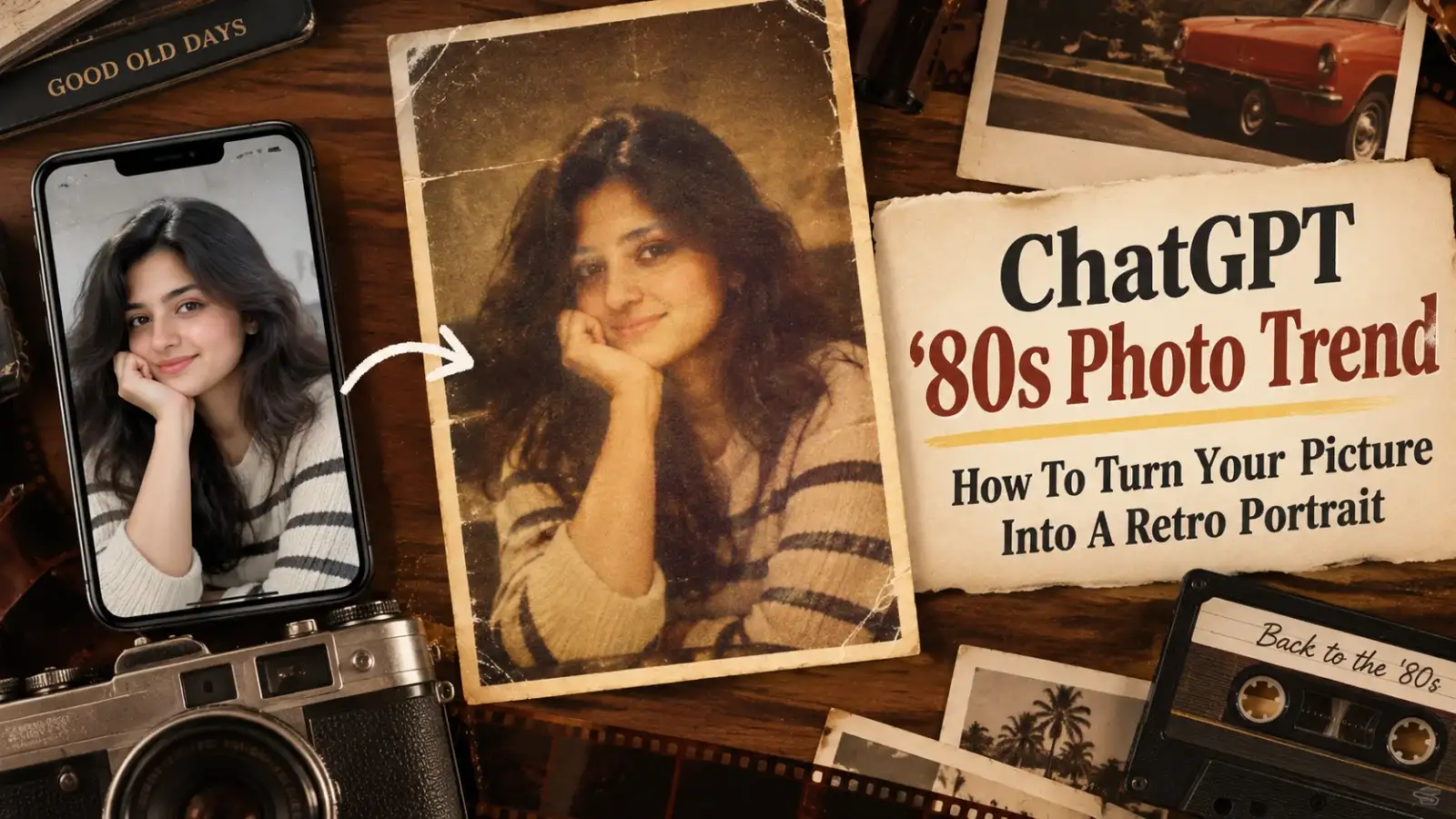
The viral ’ 80s photo trend lets users reimagine themselves with big retro hairstyles, colourful outfits, statement accessories and the slightly faded look of an old film photograph. The result can resemble a family-album picture, vintage studio portrait or even an old Bollywood-inspired photograph.
Users can upload a photograph and describe the look they want. They can ask for a particular hairstyle, outfit, jewellery, setting, lighting or camera effect while keeping their facial features recognisable.
Popular styles include retro wedding portraits, family-album photographs, old studio pictures and Bollywood-inspired looks. Women may opt for voluminous hair, bright sarees and bold jewellery, while men can try loose shirts, denim, period-style hairstyles and moustaches.
Details such as warm lighting, muted colours, soft focus and subtle film grain can make the image feel more like an analogue photograph.
Open ChatGPT and start a new chat. Upload a clear photograph using the attachment option and describe the retro style you want. Mention the clothing, hairstyle, accessories, background and overall mood.
You can also tell the AI to retain your recognisable facial features and natural appearance while changing the styling and setting.
For a more convincing vintage effect, ask for details such as 35mm film grain, faded colours, soft focus or the appearance of direct camera flash.
If the first image does not look right, you can ask for individual changes. For example, you can request a different hairstyle or outfit while asking the AI to keep the face unchanged.
“Turn this photo into a realistic 1980s-style portrait. Keep the person recognisable while giving them an authentic retro hairstyle, period-appropriate outfit, statement accessories, warm lighting, slightly faded colours and subtle analogue film grain.”
For an Indian-inspired version, you can add details such as an ’80s saree, traditional jewellery, retro studio lighting or a Bollywood-style setting.
The trend is not limited to portraits either. People are using AI to create imagined family photographs, retro wedding scenes, vintage street settings, disco-inspired pictures and old-school studio portraits.
AI makes it possible to recreate that aesthetic without owning an actual photograph from the decade. A recent picture can be transformed into something that looks as though it belongs to another era.
The ’80s photo trend therefore combines two popular interests on social media: nostalgia and AI creativity. With the right prompt, an ordinary photograph can become a fun throwback to a completely different decade.
The viral ’ 80s photo trend lets users reimagine themselves with big retro hairstyles, colourful outfits, statement accessories and the slightly faded look of an old film photograph. The result can resemble a family-album picture, vintage studio portrait or even an old Bollywood-inspired photograph.
What Is The ChatGPT ’80s Photo Trend?
The trend goes beyond adding a simple retro filter to an existing photograph. Instead, AI is used to recreate the overall appearance of an ’80s-era picture.Users can upload a photograph and describe the look they want. They can ask for a particular hairstyle, outfit, jewellery, setting, lighting or camera effect while keeping their facial features recognisable.
Popular styles include retro wedding portraits, family-album photographs, old studio pictures and Bollywood-inspired looks. Women may opt for voluminous hair, bright sarees and bold jewellery, while men can try loose shirts, denim, period-style hairstyles and moustaches.
Details such as warm lighting, muted colours, soft focus and subtle film grain can make the image feel more like an analogue photograph.
How To Create An ’80s Style Photo
Making one of these AI portraits is fairly straightforward.Open ChatGPT and start a new chat. Upload a clear photograph using the attachment option and describe the retro style you want. Mention the clothing, hairstyle, accessories, background and overall mood.
You can also tell the AI to retain your recognisable facial features and natural appearance while changing the styling and setting.
You may also like
- AI Quotient Awards 2026 to celebrate India's AI leaders turning innovation into impact
- Apple Raises iPhone Prices in India by Up to 40% Amid Rising Memory Costs
- Apple Watch Ultra 4: First impressions
- Apple Watch Series 12: First impressions
- Apple iPhone Duo, iPhone 18 Pro and iPhone 18 Pro Max launched: Check India prices, availability and all other details
For a more convincing vintage effect, ask for details such as 35mm film grain, faded colours, soft focus or the appearance of direct camera flash.
If the first image does not look right, you can ask for individual changes. For example, you can request a different hairstyle or outfit while asking the AI to keep the face unchanged.
Try This Viral ’80s Prompt
A simple prompt can be customised according to the look you want:“Turn this photo into a realistic 1980s-style portrait. Keep the person recognisable while giving them an authentic retro hairstyle, period-appropriate outfit, statement accessories, warm lighting, slightly faded colours and subtle analogue film grain.”
For an Indian-inspired version, you can add details such as an ’80s saree, traditional jewellery, retro studio lighting or a Bollywood-style setting.
The trend is not limited to portraits either. People are using AI to create imagined family photographs, retro wedding scenes, vintage street settings, disco-inspired pictures and old-school studio portraits.
Why The Trend Is So Popular
Part of the appeal comes from nostalgia. The images recreate visual details associated with a time when photographs were captured on film and often preserved in physical albums.AI makes it possible to recreate that aesthetic without owning an actual photograph from the decade. A recent picture can be transformed into something that looks as though it belongs to another era.
The ’80s photo trend therefore combines two popular interests on social media: nostalgia and AI creativity. With the right prompt, an ordinary photograph can become a fun throwback to a completely different decade.






Loving Newspoint? Download the app now
