
How Tracking Pixels in Emails Know When You Opened Them

Most people assume an email is a private thing, you open it, you read it, you move on. The sender knows you received it, but that is where their knowledge ends. Tracking pixels quietly dismantle that assumption. They are the reason a sales team can see that you opened their pitch at 7 am on a Tuesday, read it for forty seconds, and never replied.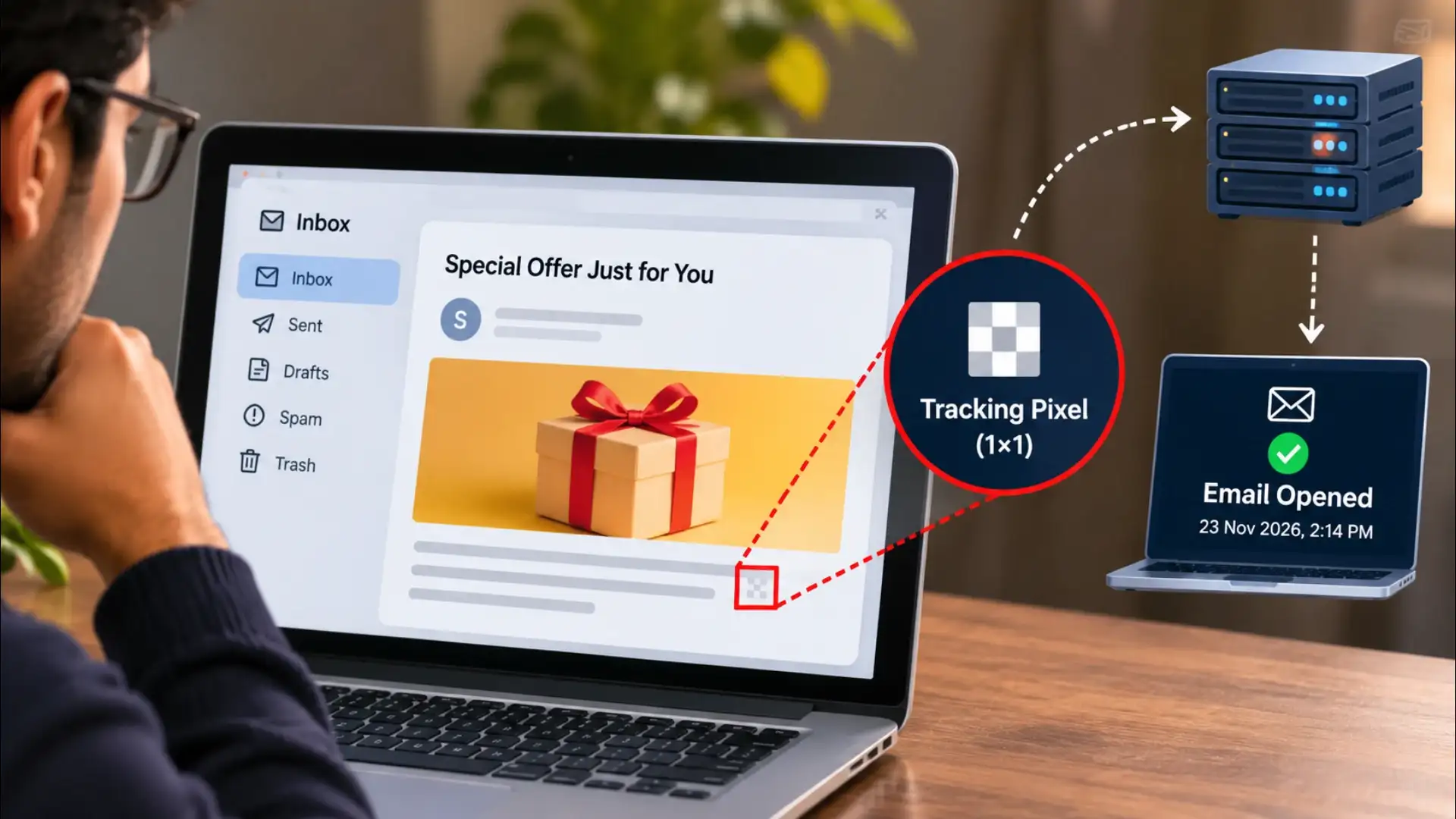
The sender's server logs that request. From the IP address, it can estimate your city and sometimes your neighbourhood. From the software string, it knows whether you opened the email on a phone or a desktop, and which email client you use. The timestamp tells it exactly when you opened the message. All of this happens in the fraction of a second it takes images to load.
The pixel itself is not a piece of malware. It does not install anything on your device, does not access your files, and does not intercept other traffic. What it does is make a normally private act, reading a message, observable by the sender.
Several major email providers now route image requests through their own proxy servers. When this happens, the pixel fires, but the IP address the sender receives belongs to the provider's server, not your device. The sender still knows the message was opened, but loses the location signal. The open timestamp may also shift, since some providers pre-fetch images before you even tap the message.
A second layer is to use an email client or provider that proxies image requests by default. This does not block the open signal entirely, but it strips out your IP address and device details, leaving the sender with far less to work with.
A third option, for people who want to examine what is in a message before loading anything, is to read emails in plain-text mode. No HTML, no images, no pixels, just the words.
What a Tracking Pixel Actually Is
A tracking pixel is a tiny image file, often exactly one pixel by one pixel, embedded in an email's HTML. It is invisible to the eye, either because it is genuinely too small to see or because it is rendered as a transparent image. When your email client loads the message and fetches images, it sends a request to the sender's server to download that pixel. That request carries information: your IP address, the time of the request, and the type of software making it.The sender's server logs that request. From the IP address, it can estimate your city and sometimes your neighbourhood. From the software string, it knows whether you opened the email on a phone or a desktop, and which email client you use. The timestamp tells it exactly when you opened the message. All of this happens in the fraction of a second it takes images to load.
Who Uses Them and Why
Marketing platforms built pixel tracking into their core product years ago. A campaign dashboard that shows open rates, click-through rates, and the best time of day to send a follow-up, all of that rests on pixel data. Sales teams use it to know when a prospect has looked at a proposal, so they can call at precisely that moment. Publishers use it to measure which subject lines pull readers in.The pixel itself is not a piece of malware. It does not install anything on your device, does not access your files, and does not intercept other traffic. What it does is make a normally private act, reading a message, observable by the sender.
Why Your Email Client Is the Key Variable
Whether a pixel fires depends almost entirely on how your email client handles remote images. Clients that load all images automatically the moment you open a message will fire every pixel, every time. Clients that block remote images by default, or ask you before loading them, stop the pixel from phoning home. The pixel cannot report anything if its image request never goes out.Several major email providers now route image requests through their own proxy servers. When this happens, the pixel fires, but the IP address the sender receives belongs to the provider's server, not your device. The sender still knows the message was opened, but loses the location signal. The open timestamp may also shift, since some providers pre-fetch images before you even tap the message.
How to Reduce What You Send Back
The most direct control is your email client's image-loading setting. Turning off automatic image loading means no pixel fires until you choose to load images, and for most emails, you never need to. The trade-off is that some newsletters look broken without their images, and some senders use images to carry useful content rather than just tracking.A second layer is to use an email client or provider that proxies image requests by default. This does not block the open signal entirely, but it strips out your IP address and device details, leaving the sender with far less to work with.
A third option, for people who want to examine what is in a message before loading anything, is to read emails in plain-text mode. No HTML, no images, no pixels, just the words.
The Broader Picture
Tracking pixels are one of the older techniques in the web's surveillance toolkit, but they persist because they work and because most people never know they are there. Email feels more private than a website, so the same data collection that would feel obvious on a browser goes unnoticed in an inbox. The pixel exploits that gap between perception and reality. Knowing it exists does not make it go away, but it does change what you decide to load.Next Story