
What Are the 4 Main Parts of a URL and What Do They Mean?
A web address looks like a single thing, but it is four things stacked together. Each part was designed by a different group of engineers for a different purpose, and each one tells you something the others cannot. Once you know how to read them separately, a URL stops being noise and starts being information.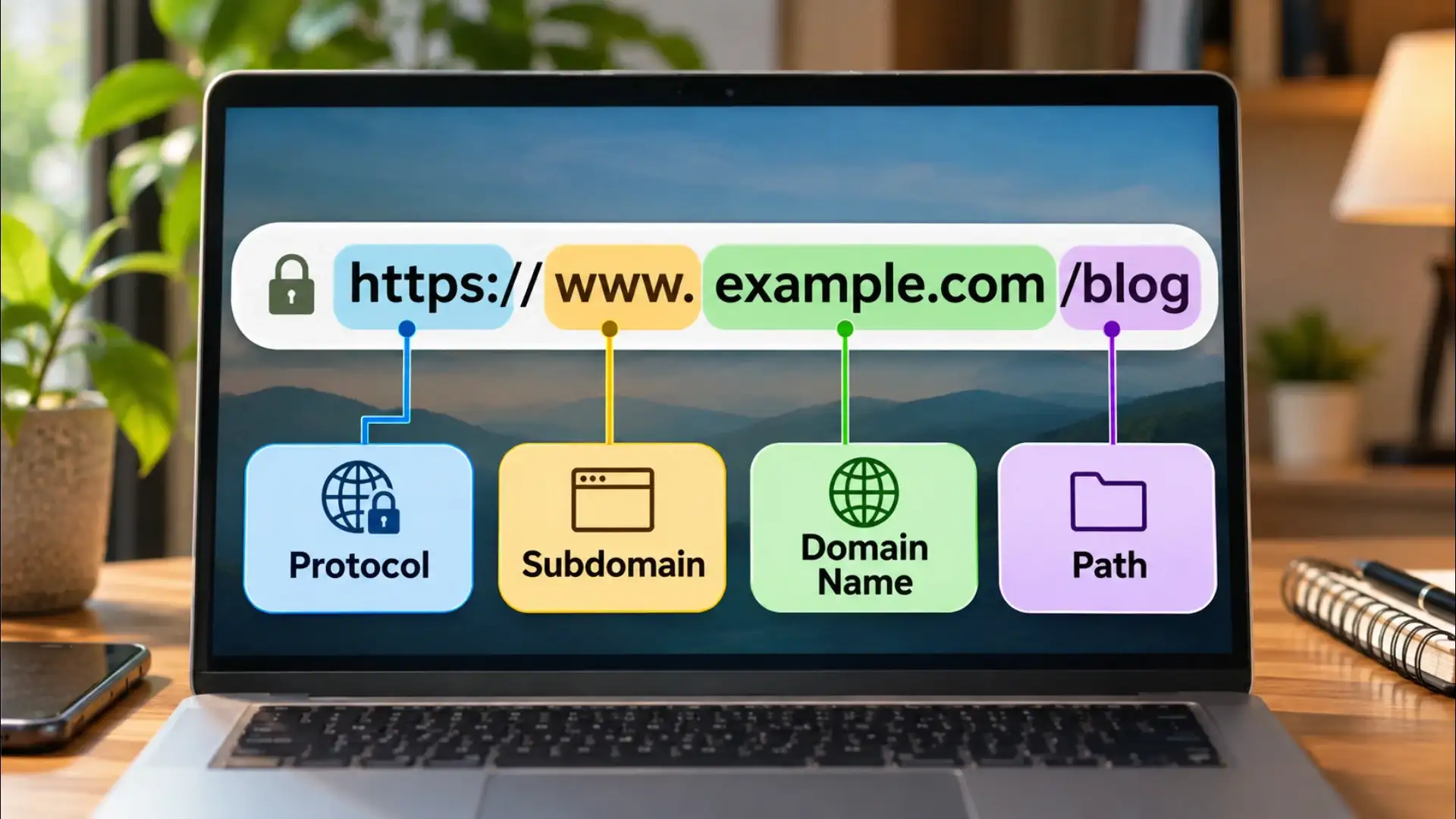
The s in https stands for secure. It means the connection between your device and that server is encrypted. A third party sitting on the same Wi-Fi network as you cannot read what passes between the two ends. When a site still uses plain http, that protection is absent. Browsers now flag this visibly. Seeing http on a page that asks for a password or a card number is a reason to stop.
The domain name has its own internal structure. The word or words before the final dot are the second-level domain, the name the owner registered and paid for. The part after the final dot is the top-level domain. Common ones are .com, .org, .in, and .gov. The top-level domain was originally meant to signal the type of organisation: .gov for government bodies, .edu for educational institutions, .org for non-profits. In practice, .com is now used by almost anyone. The country-code versions, like .in for India or .uk for the United Kingdom, still carry geographic meaning.
Reading the domain name carefully is one of the most reliable ways to spot a fake site. A phishing page will often use a domain that resembles a real one but differs by a single letter, or it will put the real brand name in a subdomain rather than in the registered domain itself. The registered domain is always the word immediately to the left of the top-level domain. Everything to its left is controlled by whoever owns that domain, not by a separate authority.
A path like /technology/how-browsers-work is the server's internal filing system made visible. Each forward slash marks a level deeper into that structure. Some sites use paths that describe the content in plain words, which helps both readers and search engines understand what a page is about before it loads. Others use paths made of numbers or codes, which carry the same routing function but reveal nothing to a human reader.
When a URL has no path after the domain, or shows only a single forward slash, you are at the root of the site, typically the homepage or the main landing page.
A search on any major site produces a URL with a query string. The words you typed appear after a parameter name, often something like q= or query=, followed by an equals sign and your search terms. When you filter a product list by colour or price, those choices usually appear in the query string as well. The server reads each parameter, processes the request accordingly, and sends back a page built for that specific combination.
Query strings are also used to track where traffic comes from. A link shared in an email newsletter might carry a parameter like utm_source=newsletter so the site owner can see how many visitors arrived from that specific source. The tracking parameter changes nothing about the page you see. It is information passed to the server for measurement purposes.
Taken together, the four parts of a URL describe a complete transaction: the rules of communication, the location of the server, the specific resource being requested, and any additional instructions for how to serve it. Reading a web address from left to right is reading a set of instructions written for machines, and once you know the grammar, it reads clearly.
The Protocol: The Handshake Before the Page Loads
The characters before the colon and the two forward slashes are the protocol. In almost every address you see today, this is either http or https. The protocol is the agreed set of rules your browser and the web server use to talk to each other, the way two people agree to speak in the same language before a conversation begins.The s in https stands for secure. It means the connection between your device and that server is encrypted. A third party sitting on the same Wi-Fi network as you cannot read what passes between the two ends. When a site still uses plain http, that protection is absent. Browsers now flag this visibly. Seeing http on a page that asks for a password or a card number is a reason to stop.
The Domain Name: The Human-Readable Address of a Server
After the two forward slashes comes the domain name. This is the part most people think of as the website itself: something like wikipedia.org or timesofindia.com. The domain name exists because computers route traffic using numbers, not words. A domain name is a label that points to a numerical address, called an IP address, so that humans do not have to memorise strings of digits.The domain name has its own internal structure. The word or words before the final dot are the second-level domain, the name the owner registered and paid for. The part after the final dot is the top-level domain. Common ones are .com, .org, .in, and .gov. The top-level domain was originally meant to signal the type of organisation: .gov for government bodies, .edu for educational institutions, .org for non-profits. In practice, .com is now used by almost anyone. The country-code versions, like .in for India or .uk for the United Kingdom, still carry geographic meaning.
Reading the domain name carefully is one of the most reliable ways to spot a fake site. A phishing page will often use a domain that resembles a real one but differs by a single letter, or it will put the real brand name in a subdomain rather than in the registered domain itself. The registered domain is always the word immediately to the left of the top-level domain. Everything to its left is controlled by whoever owns that domain, not by a separate authority.
The Path: The Filing System Inside the Site
After the domain name, a forward slash marks the beginning of the path. The path tells the server which specific page, file, or resource you are requesting. Think of it the way a library uses shelves, sections, and shelf positions. The domain gets you to the library. The path gets you to the exact book.A path like /technology/how-browsers-work is the server's internal filing system made visible. Each forward slash marks a level deeper into that structure. Some sites use paths that describe the content in plain words, which helps both readers and search engines understand what a page is about before it loads. Others use paths made of numbers or codes, which carry the same routing function but reveal nothing to a human reader.
When a URL has no path after the domain, or shows only a single forward slash, you are at the root of the site, typically the homepage or the main landing page.
The Query String: The Question You Are Asking the Server
The fourth part appears less often in everyday browsing but is everywhere behind the scenes. After the path, a question mark introduces the query string. This is a set of parameters passed to the server to refine or customise what comes back.A search on any major site produces a URL with a query string. The words you typed appear after a parameter name, often something like q= or query=, followed by an equals sign and your search terms. When you filter a product list by colour or price, those choices usually appear in the query string as well. The server reads each parameter, processes the request accordingly, and sends back a page built for that specific combination.
Query strings are also used to track where traffic comes from. A link shared in an email newsletter might carry a parameter like utm_source=newsletter so the site owner can see how many visitors arrived from that specific source. The tracking parameter changes nothing about the page you see. It is information passed to the server for measurement purposes.
Taken together, the four parts of a URL describe a complete transaction: the rules of communication, the location of the server, the specific resource being requested, and any additional instructions for how to serve it. Reading a web address from left to right is reading a set of instructions written for machines, and once you know the grammar, it reads clearly.
Next Story