
Instagram’s Viral AI Chibi Trend: How To Create Adorable Anime Versions Of Yourself

Instagram is currently flooded with the viral AI Chibi trend . This latest obsession with adorable chibi characters has taken over social media feeds, with users transforming their regular photos into miniature anime-inspired avatars using AI tools like ChatGPT and Google Gemini. These AI-generated chibi characters are rapidly gaining popularity not just on Instagram, but also across short-video platforms. The trend perfectly blends internet creativity, anime culture, and AI-powered personalisation into one highly addictive social media aesthetic. From influencers to casual users, everyone seems to be joining the viral wave and here’s how you can do it too.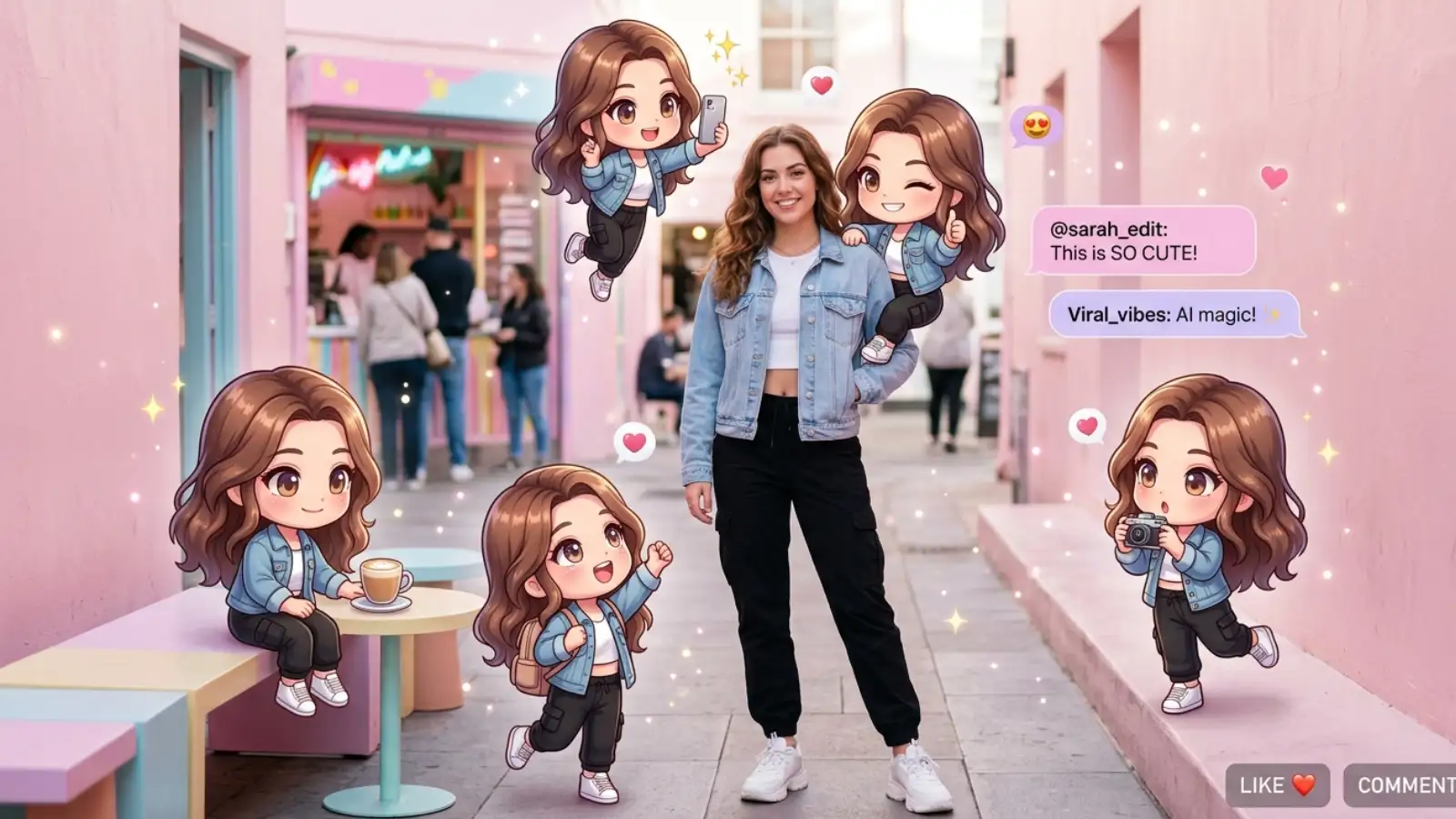
The trend allows users to create tiny animated versions of themselves inspired by their real appearance, outfits, hairstyles, and personalities. Many social media posts also showcase multiple miniature chibi clones surrounding the real person, creating visually playful Instagram-style compositions that feel both cinematic and nostalgic.
Recent reports suggest that AI-generated anime portraits, cartoon avatars, and stylised digital edits are rapidly becoming a part of everyday online identity and self-expression, especially among younger users.
How To Create Your Own Chibi Version?
Soft Pastel Chibi
“Turn this photo into a cute chibi anime character with oversized eyes, tiny body proportions, pastel pink and blue tones, soft lighting, kawaii aesthetic, glossy anime art style.”
Instagram Viral Chibi Edit
“Create a viral Instagram-style chibi version of this person with adorable anime features, sparkles, dreamy pastel background, expressive face, glossy textures, ultra-cute AI art.”
Real Person + Chibi Clones
“Keep the real person in the center and surround them with multiple tiny chibi versions inspired by their outfit, hairstyle, personality, playful poses, Instagram aesthetic.”
Cozy Café Chibi
“Transform this person into a cozy anime chibi character sitting in a warm café, soft lighting, cute desserts, aesthetic background, pastel tones, Studio Ghibli-inspired atmosphere.”
Y2K Chibi Aesthetic
“Create a Y2K-inspired chibi anime version with glossy fashion, cyber stickers, pink sparkles, retro internet vibe, oversized eyes, playful anime aesthetic.”
This viral Chibi AI trend highlights how social media is becoming increasingly personalised, playful, and visually imaginative. The anime-inspired art style has emerged as one of Instagram’s biggest viral aesthetics, allowing users to transform ordinary selfies into expressive miniature versions of themselves with just a few prompts.
What Exactly Is The Chibi AI Trend?
This trend is inspired by the popular Japanese “chibi” art style. The word “chibi” originates from Japanese anime and manga culture, where characters are intentionally drawn with exaggerated miniature proportions to appear cuter, more expressive, and emotionally dramatic. These features often include oversized eyes, pastel aesthetics, and playful personality.The trend allows users to create tiny animated versions of themselves inspired by their real appearance, outfits, hairstyles, and personalities. Many social media posts also showcase multiple miniature chibi clones surrounding the real person, creating visually playful Instagram-style compositions that feel both cinematic and nostalgic.
Recent reports suggest that AI-generated anime portraits, cartoon avatars, and stylised digital edits are rapidly becoming a part of everyday online identity and self-expression, especially among younger users.
How To Create Your Own Chibi Version?
- Open Google Gemini or ChatGPT with image editing features
- Upload a clear selfie with good lighting
- Paste a Chibi AI prompt describing the style you want
- Choose image sizes like 1:1 or 4:5 for Instagram posts
- Turn on high-quality generation mode if available
- Generate the image and save your favorite version
- Add cute effects like sparkles, pastel colors, or anime filters if needed
- Clear and expressive selfies usually give better Chibi AI results
Prompts You Can Experiment With
Below are some prompts you can use use to create your very own chibi version:You may also like
- Gold Price Today: Gold Gets Costlier Again as 22-Carat Rate Crosses ₹1.45 Lakh in Mumbai and Kolkata
- Silver Price Today: Silver Rates Drop Again Amid Global Tensions, Check Latest Prices in Your City
- 8th Pay Commission Update: Government Signals Relief for Employees and Pensioners on 5 Major Demands
- Inflation Can Shrink Your Wealth: How ₹1 Crore in FD or Savings May Lose Value Over 10 Years
- ITR Filing 2026: Why Farmers Don't Pay Income Tax on Agricultural Earnings in India
Soft Pastel Chibi
“Turn this photo into a cute chibi anime character with oversized eyes, tiny body proportions, pastel pink and blue tones, soft lighting, kawaii aesthetic, glossy anime art style.” Instagram Viral Chibi Edit
“Create a viral Instagram-style chibi version of this person with adorable anime features, sparkles, dreamy pastel background, expressive face, glossy textures, ultra-cute AI art.” Real Person + Chibi Clones
“Keep the real person in the center and surround them with multiple tiny chibi versions inspired by their outfit, hairstyle, personality, playful poses, Instagram aesthetic.” Cozy Café Chibi
“Transform this person into a cozy anime chibi character sitting in a warm café, soft lighting, cute desserts, aesthetic background, pastel tones, Studio Ghibli-inspired atmosphere.”Y2K Chibi Aesthetic
“Create a Y2K-inspired chibi anime version with glossy fashion, cyber stickers, pink sparkles, retro internet vibe, oversized eyes, playful anime aesthetic.” This viral Chibi AI trend highlights how social media is becoming increasingly personalised, playful, and visually imaginative. The anime-inspired art style has emerged as one of Instagram’s biggest viral aesthetics, allowing users to transform ordinary selfies into expressive miniature versions of themselves with just a few prompts.






More from our partners


Loving Newspoint? Download the app now

